![image-1.png]](https://24983242.hs-sites-eu1.com/hs-fs/hubfs/image-1.png?height=42&name=image-1.png)
This tab allows you to see and configure the general settings of the EYESEE solution.
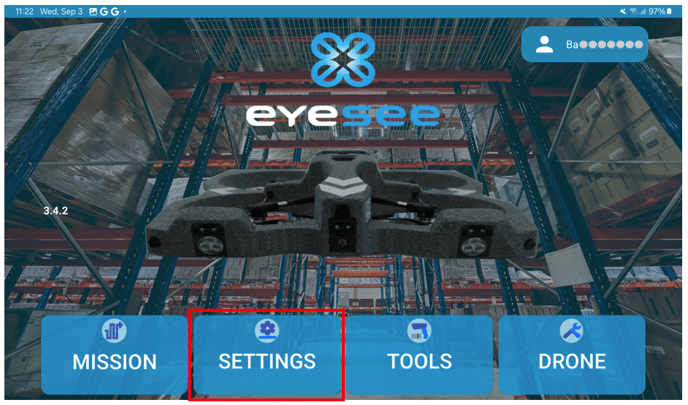
From the main screen, click on Settings
Then click on General:
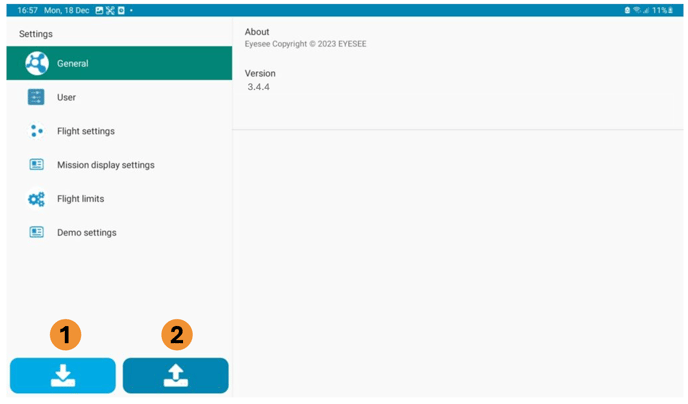
About: Provides the legal notices of the application
Version: Indicates the version of the installed application
-
Allows you to load a settings configuration from the tablet.
When clicking on the button, this screen appears:
![Screenshot_20250915_115117_Files[1]](https://24983242.hs-sites-eu1.com/hs-fs/hubfs/Screenshot_20250915_115117_Files%5B1%5D.jpg?width=688&height=430&name=Screenshot_20250915_115117_Files%5B1%5D.jpg)
2. Allows you to save the settings configuration to the tablet.
When clicking on the button, this screen appears:
![Screenshot_20250915_120223_Eyesee[1]](https://24983242.hs-sites-eu1.com/hs-fs/hubfs/Screenshot_20250915_120223_Eyesee%5B1%5D.jpg?width=688&height=430&name=Screenshot_20250915_120223_Eyesee%5B1%5D.jpg)